Pick a goal and LiftSheet builds you a complete program in 60 seconds. Log every set with one tap, and track cardio (treadmill, rower, bike) in the same session. Balance analysis catches push/pull and muscle pair gaps before they become problems. 3,700+ exercises, every variation.
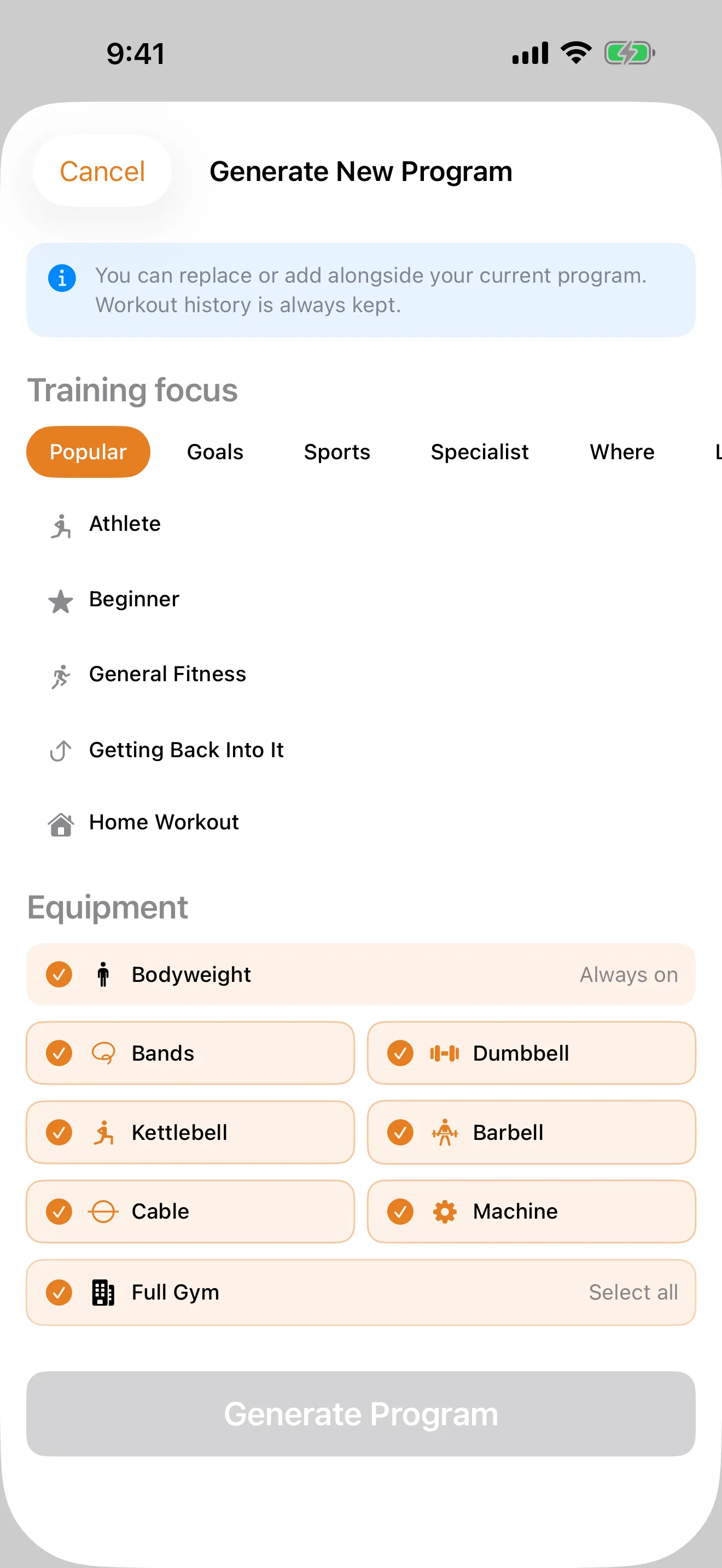
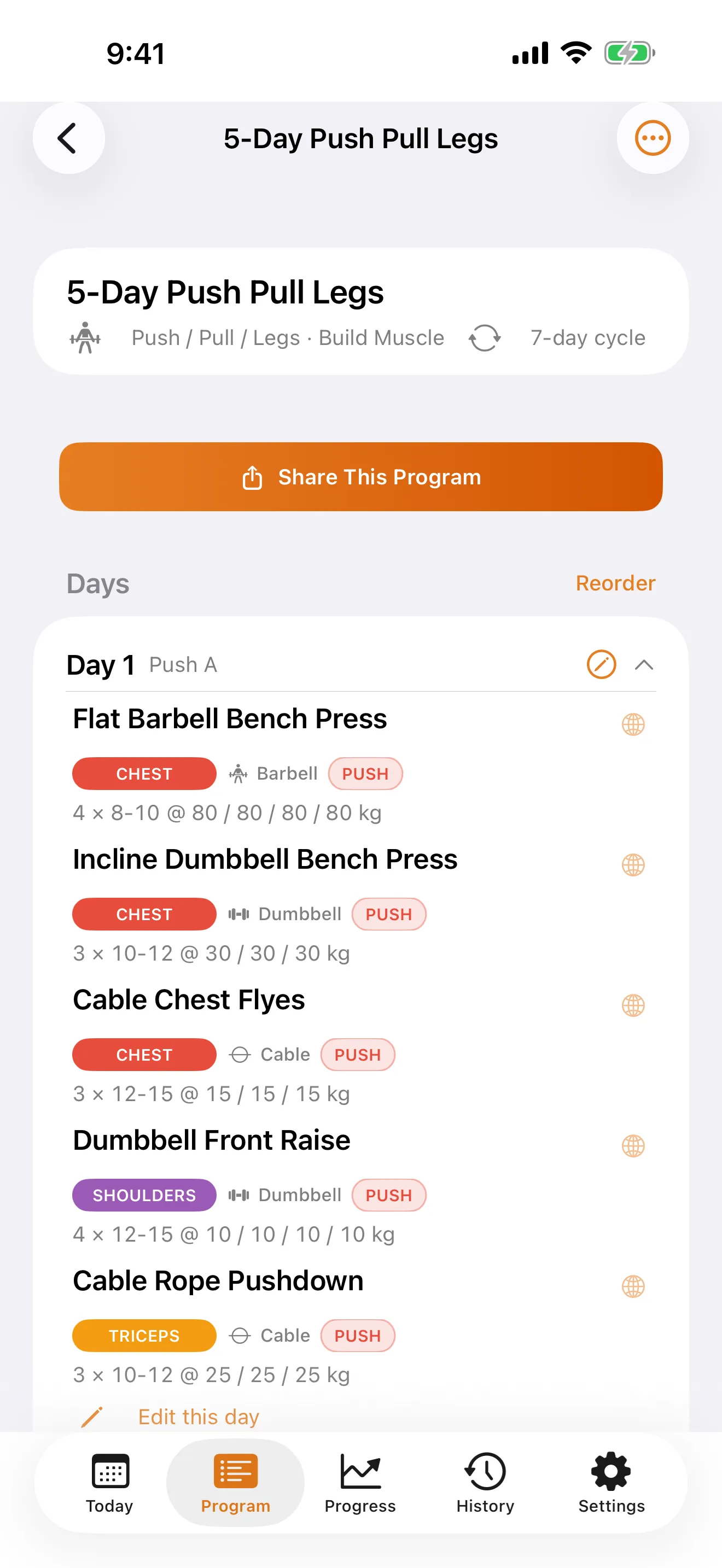
Pick a goal, choose your training split, tell LiftSheet what equipment you have. A complete program lands in 60 seconds, with eight split types and exercises matched to your gear and training style. Fully customisable from day one.
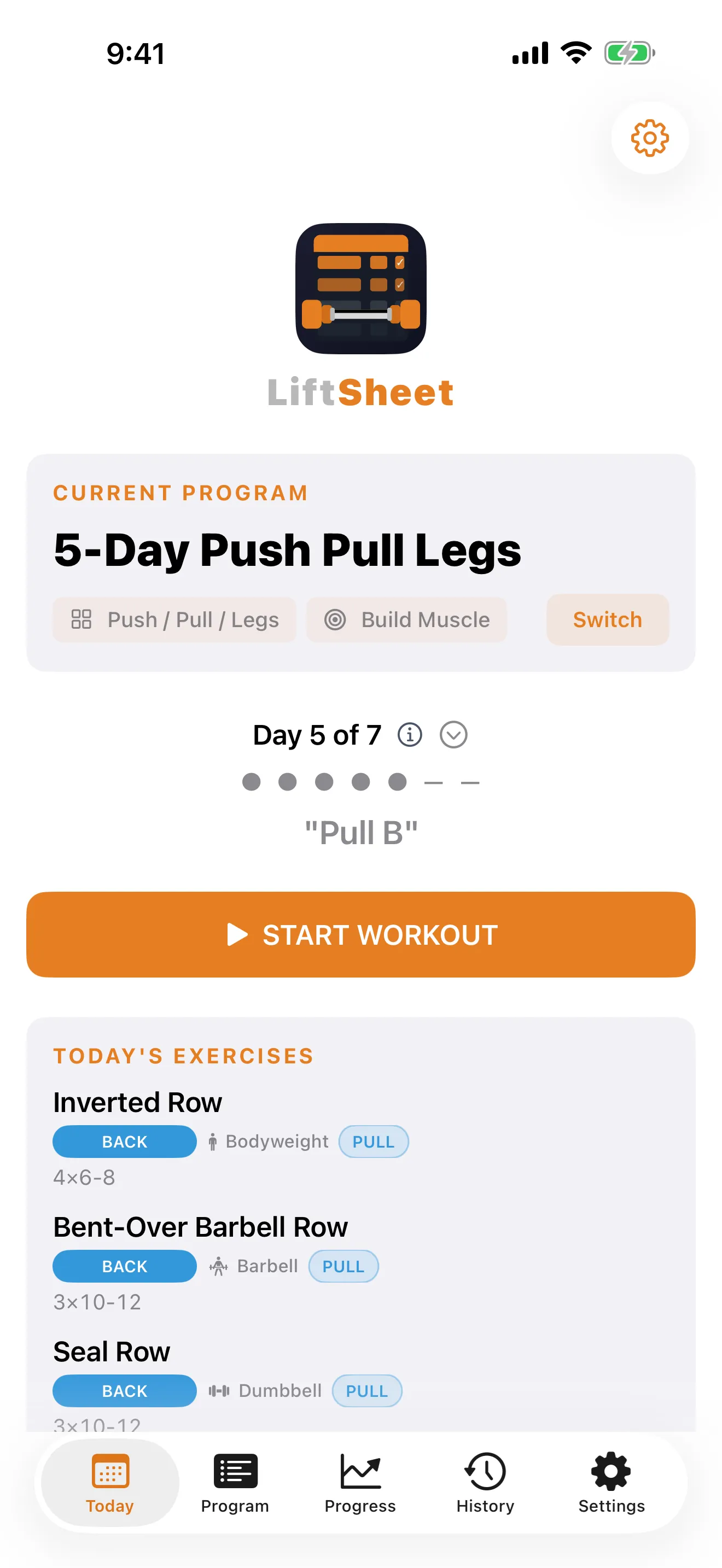
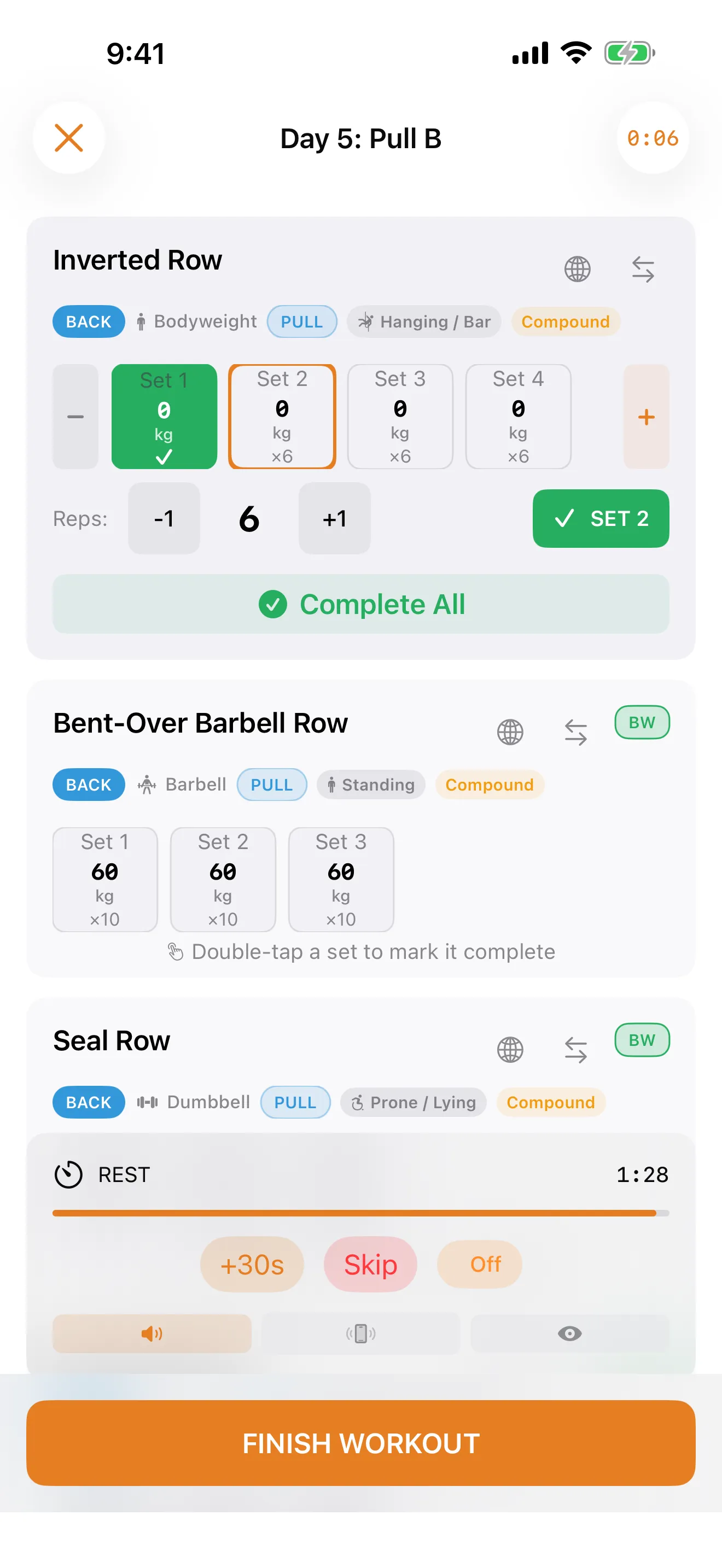
Weights carry over from your last session automatically. Log reps and weight in a single tap, then log cardio (treadmill, rower, bike, elliptical and more) by duration, distance, and pace right beside your strength sets. Completed exercises collapse out of the way so only your remaining work stays on screen. Log faster than you rest.
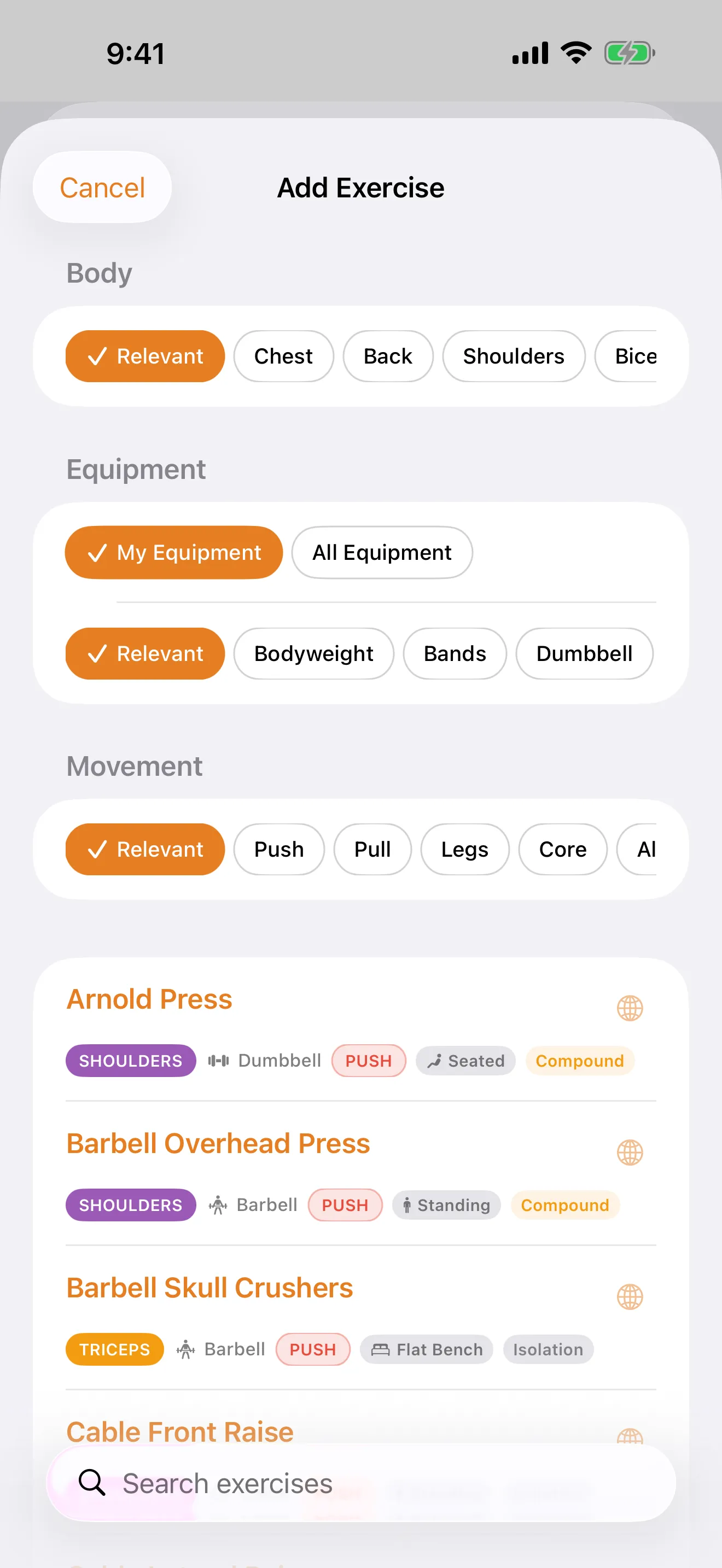
3,700+ exercises across 15 muscle groups, filterable by equipment, movement pattern, and body posture. A structured how-to guide on every entry. Alternatives ranked by what you actually lift, not generic lookup. Your most-used pinned to the top of every picker.
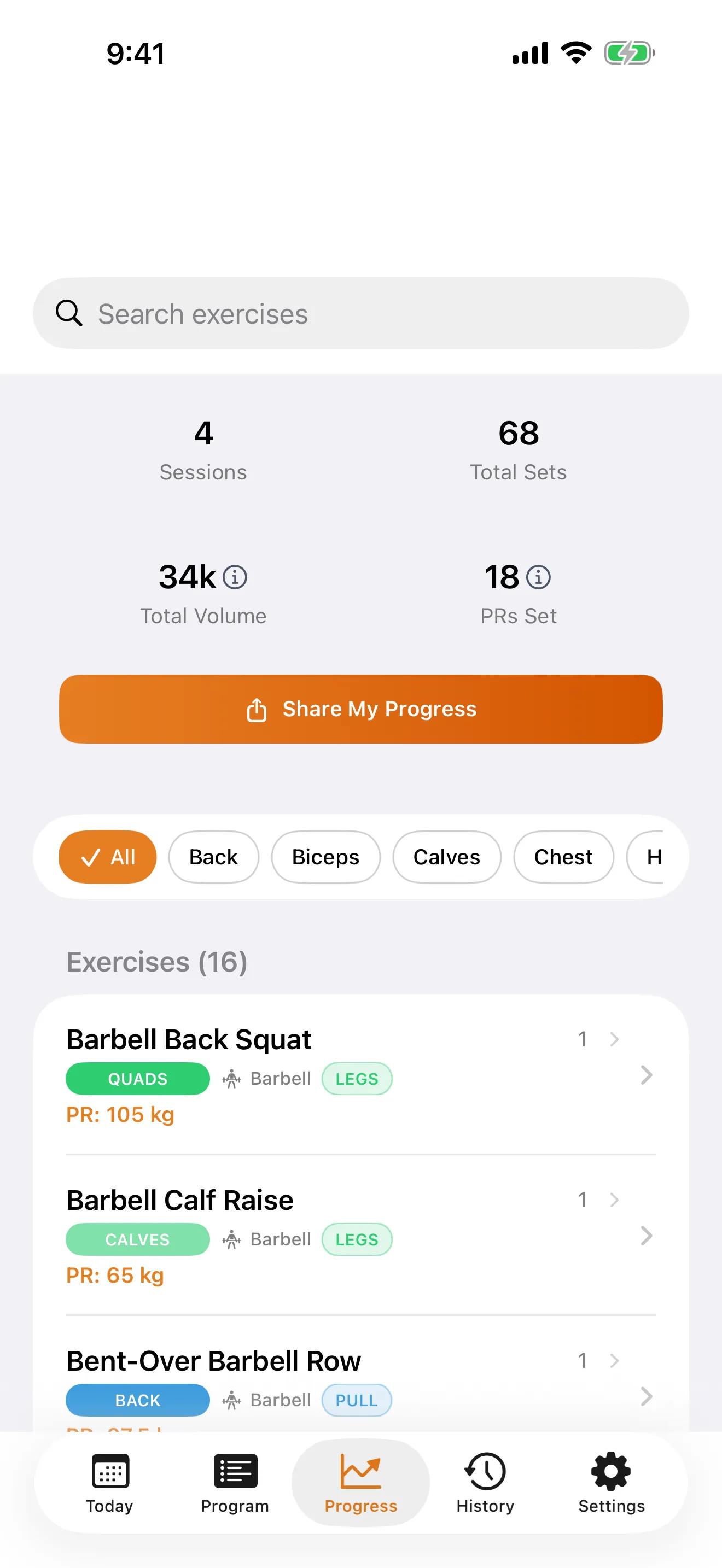
Year activity heatmap shows every training day across the last 365 days coloured by volume. Tap any cell to jump to that session. Automatic PR detection mid-workout with a celebration banner. Per-exercise progress charts, estimated 1RM, and full PR history.
Push/Pull, Hinge/Squat, Upper/Lower ratios computed from your last 90 days of training. Muscle pair breakdowns across Back/Chest, Quads/Hamstrings, Biceps/Triceps, and more. Each rated Good, Fair, or Needs work. Tap Improve to swap or add an exercise, and the picker pre-filters to exactly what will help.
Branded PDFs with your logo and business name. Share cards that replace the LiftSheet crest with your studio logo, so every post your clients make quietly markets you. Templates, client management, and private notes included. Coaching features without the $50/month platform.

Pick a goal. Get a program.

One tap per set.

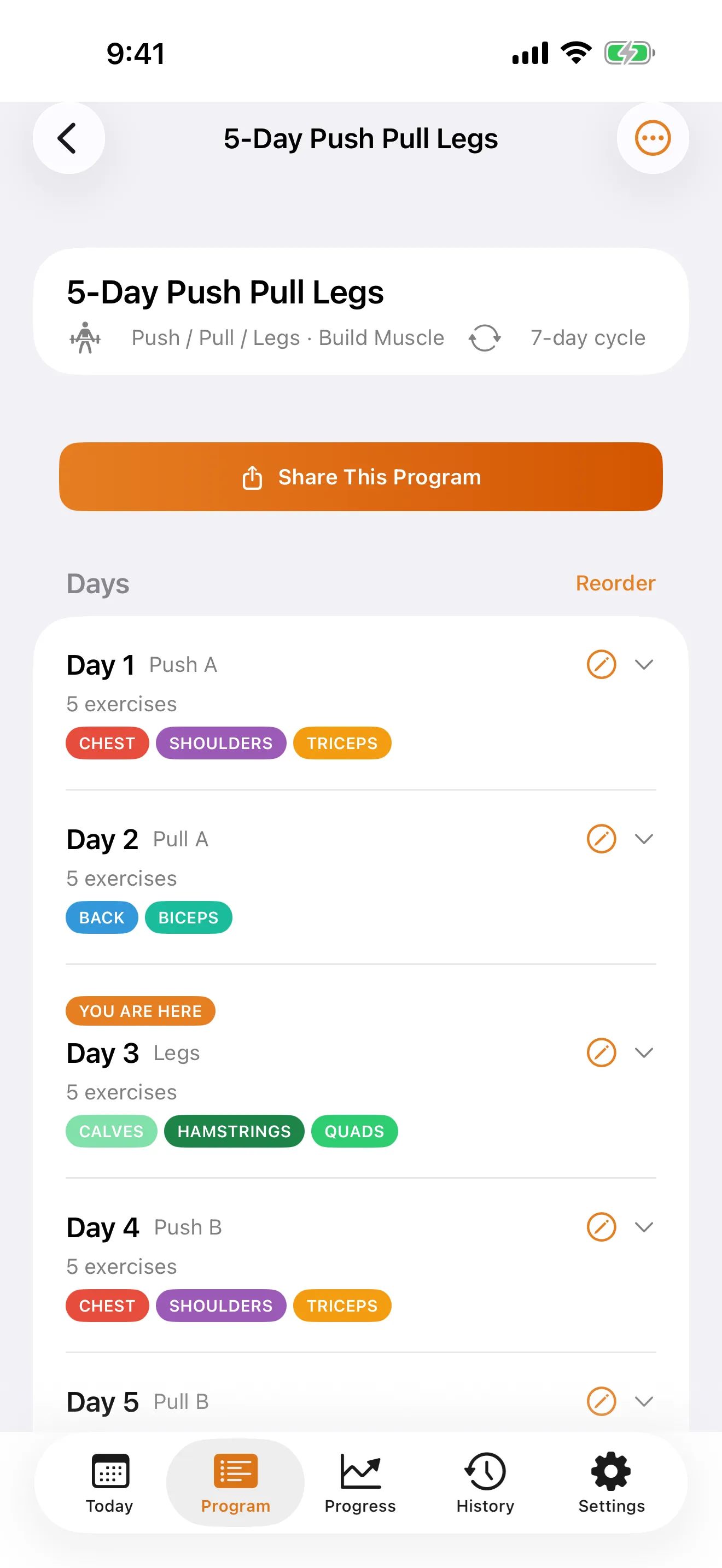
Eight split types.

Shuffle without losing your main lift.

Year activity heatmap.

PRs, charts, 1RM.

3,700+ variations.

Five formats, one tap.

Branded exports.

Travelling mode, reminders.
New installs get a 30-day trial with full Pro access, no credit card required. Pricing shown in your local currency on the App Store.
About LiftSheet
LiftSheet is a free iOS workout planner and tracker built for lifters. It includes a 3,700+ exercise library with structured how-to guides, a smart program builder across 8 split types, a year activity heatmap, calendar-driven training history, automatic PR tracking, and shareable workout cards. The free tier supports up to 5 programs with no ads and no third-party trackers.
Yes. LiftSheet works offline and doesn't require an account to get started. Open the app, pick a goal, and start training. You can export programs as .liftsheet files or PDFs to share with friends or coaches. The app contains no ads and no third-party tracking SDKs.
Yes. LiftSheet's program builder lets you create fully custom programs across eight split types (Push/Pull/Legs, Upper/Lower, Full Body, One Muscle Per Day, Body Part Focus, Arnold Split, the Upper/Lower/PPL hybrid, and Custom), choose from 3,700+ exercises filtered by muscle group and equipment, set target reps, sets, and rest timers per exercise, and schedule training days. You can also auto-populate exercises based on your equipment and goals.
Yes. LiftSheet generates polished share cards in five formats (portrait, story, square, landscape, and custom) for finished workouts, new PRs, full program previews, progress snapshots, and any session from your history. Tap Share and send directly to Instagram Stories, Messages, email, AirDrop, or any iOS share target. You can also toggle "Hide Numbers" to share without revealing your weights and reps.
LiftSheet automatically detects and tracks personal records across every exercise. When you hit a new PR during a workout, a celebration banner pops up immediately with the new weight and delta. Your PR history sits in the Progress tab alongside per-exercise charts and estimated 1RM, and any PR can be shared as a polished image card.
Yes. LiftSheet includes a full library of bodyweight exercises and you can build programs using only bodyweight, resistance bands, or minimal equipment. The program builder filters exercises based on your available equipment, so home and park workouts are fully supported.
The Free tier includes up to 5 programs, the full 3,700+ exercise library with structured how-to guides, session logging, rest timer, PR tracking, year activity heatmap, calendar-driven history, and shareable workout cards, with no ads, forever. New installs get a 30-day trial with full Pro access. Pro is available monthly, annually, or as a one-time Lifetime purchase, and all three unlock unlimited programs. The Trainer tier (Monthly, Annual, or Lifetime) adds branded exports, client program management, templates, and private notes.
No. LiftSheet contains no advertising, no Google Analytics, no Facebook SDK, no third-party tracking pixels, and no ad networks. The full feature set is available without giving up attention or attention data.
LiftSheet supports eight split types: Push/Pull/Legs, Upper/Lower, Full Body, One Muscle Per Day, Body Part Focus, Arnold Split, the five-day Upper/Lower/PPL hybrid, and fully custom. The program builder adjusts the split based on your training frequency. For example, PPL needs at least 3 days and the ULPPL hybrid is built for 5 days. You can also set custom weekly or rotating schedules.
For Lifters
Tap a program from your home screen, pick the day's workout, and start logging. LiftSheet walks you through each set with one-tap entry for reps, weight, and notes. The rest timer kicks in automatically between sets.
Yes. LiftSheet supports two optional reminders. A same-day reminder fires before your scheduled session, and a plan-ahead reminder fires the evening before each training day so tomorrow's workout never sneaks up on you. Both are opt-in from Settings → Notifications.
Yes. When you finish a workout, LiftSheet checks every other program for slots using the same exercises and offers to propagate your just-finished weights to all of them in one tap. Per-exercise opt-outs stick, so if you deliberately run different weights in different programs, switch the prompt off for that exercise and it won't ask again.
Yes. Tap the swap icon on any exercise card during an active workout to open the Alternatives panel. The top alternative carries a flame badge if it's one of your most-trained lifts, since alternatives are ranked by your actual training history, not generic muscle-group lookup. Pick whether the swap applies to today only or permanently rewrites your program, all from one sheet.
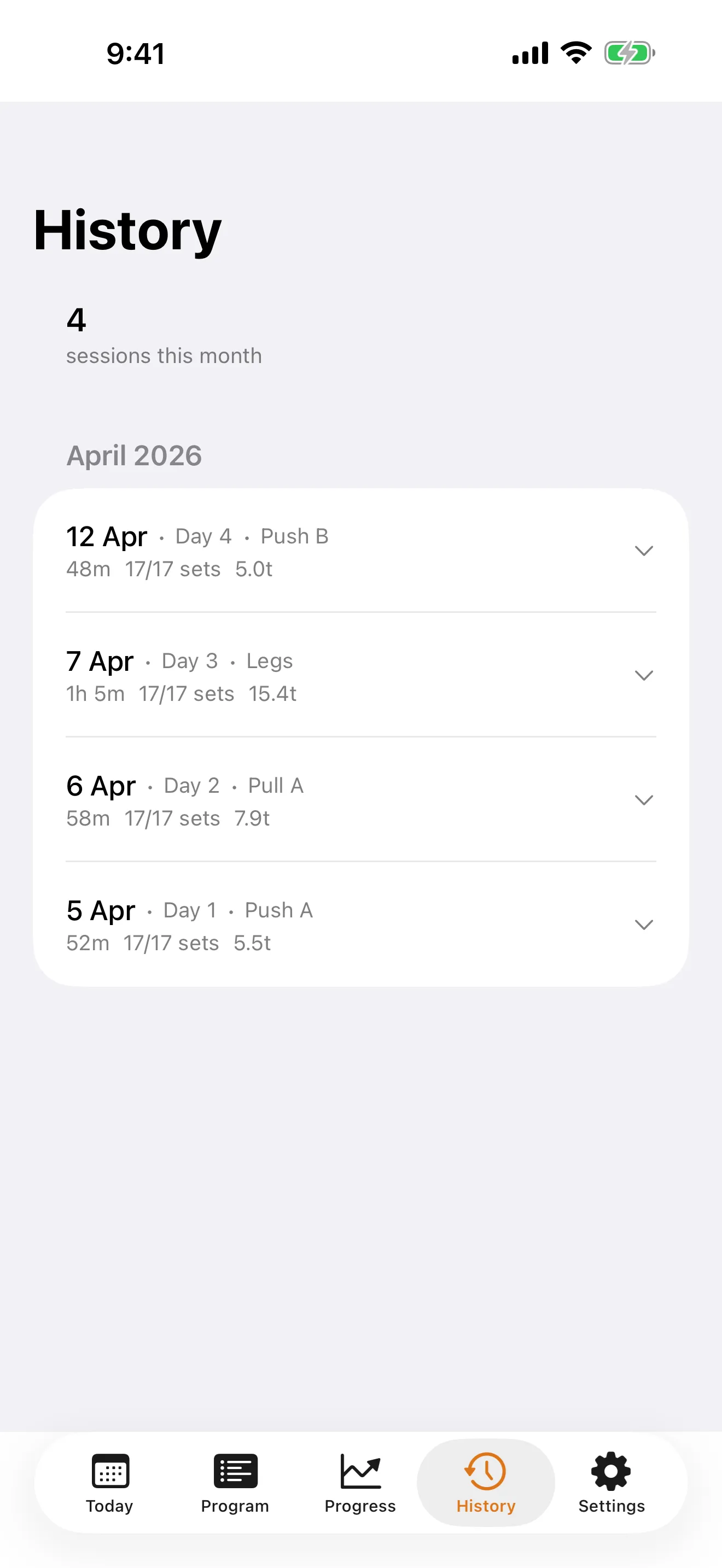
Yes. LiftSheet tracks cardio alongside strength in the same session, with no separate app and no context switch. Add a cardio machine (treadmill, rowing machine, exercise bike, elliptical, stair climber, ski-erg, or air bike) to any program day and log it by duration (MM:SS), distance, and pace right beside your working sets. Distance units are independent of your weight unit, so you can lift in kg while logging runs in miles. Cardio time appears in your session summary next to total volume, and every cardio session counts toward your year activity heatmap and training history.
Yes. The History tab includes a year activity heatmap, with every training day across the last 365 days shown as a grid cell, coloured by session volume. Tap any cell to jump to that workout. A persistent 7-day strip sits at the top of the screen, and a graphical calendar picker (with training-day dots under each date) lets you jump to any date or filter the list to a date range.
Yes. The Balance tab in Progress shows Push/Pull, Hinge/Squat, and Upper/Lower movement pattern ratios computed from your last 90 days of training, plus antagonist muscle pair analysis covering Back/Chest, Quads/Hamstrings, Biceps/Triceps, Glutes/Hip Flexors, and Abductors/Adductors, each rated Good, Fair, or Needs work. Tap "Improve [name]" on any imbalanced row to choose between swapping an existing exercise or adding a new one, with the exercise picker pre-filtered to the relevant movement pattern.
Program Balance applies the same Push/Pull, Hinge/Squat, and muscle pair analysis to your planned program's sets per cycle, not just your session history. Tap the Balance button on any program to see how balanced your program is before you even start training it. The same "Improve" flow lets you fix gaps directly from there.
LiftSheet's exercise picker and swap panel rank alternatives by your actual training history, so the lifts you train most are surfaced first, with a flame "Most used" badge on the top picks. A "Frequently used" section is pinned to the top of every exercise picker. The ranking updates locally as you log more sessions, so the picker stays tuned to how you actually train.
Yes. All 3,700+ exercises in the library carry a structured how-to-perform guide with setup and execution steps, sized for a phone screen. Tap any exercise in the library, picker, or program detail to read its guide. Coverage is 100%. Every variation, even long-tail or specialty lifts.
Export any program as a .liftsheet file from the Share menu, then open it on your other device, and it imports into Programs instantly. Your device's iCloud backup (if enabled in iOS Settings) will also preserve your workout history alongside the rest of your app data.
Travelling Mode lets you switch your active program to a bodyweight, hotel-gym, or lighter alternative program for the week, without losing your place in your main program. When you're home, switch back with one tap and pick up exactly where you left off.
Pro and Lifetime users can export in three formats. Go to a program and tap Share: choose PDF for a printable workout sheet, .liftsheet to share the program with another LiftSheet user, or CSV for your own analysis. Exports are generated on-device instantly.
On a new device, go to Settings > Restore Purchases and sign in with the Apple ID you originally purchased with. Your Pro, Pro Lifetime, or Trainer tier entitlement is restored immediately. You can restore as often as you need, at no cost.
Manage or cancel through your Apple ID: iOS Settings > [Your Name] > Subscriptions > LiftSheet > Cancel Subscription. You'll keep Pro access until the end of the current billing period. Pro Lifetime and Trainer Lifetime are one-time purchases with nothing to cancel.
For Trainers
Open the Trainer Library and tap New Template. Build it exactly like a normal program: days, exercises, sets, reps, and rest timers. Save it once and reuse it for any number of clients. Editing a template never touches the client programs you've already created from it.
From the Trainer Library, tap a template and choose "Use for Client." Enter the client's name (or pick from your existing clients) and LiftSheet deep-copies the entire template into a fresh program stamped with that client's name. Edits to the client's copy won't affect the template.
Open the program and tap Share. Send the .liftsheet file through any channel: email, AirDrop, Messages, or WhatsApp. Your client opens it in LiftSheet (Free tier works) and it lands in their Programs list, ready to train. You can also send a branded PDF if they'd prefer a printable sheet.
Yes. Trainer notes and client names live on your device only and are stripped from every export: the PDF, the .liftsheet file, and everything your client receives. Your client never sees anything you don't explicitly put in the workout itself.
With the Trainer tier (available as Monthly, Annual, or Lifetime), PDF exports include your name, business name, tagline, and your uploaded logo on the cover and header of every page. Set it up once in Trainer Settings and every program export carries your branding. Great for handing off polished plans to new clients.
With the Trainer tier (Monthly, Annual, or Lifetime), every share card LiftSheet generates (workout complete, PR, program preview, progress, and history) automatically swaps the default crest for your studio logo and coach name. The LiftSheet wordmark stays in place but small and subordinate to your brand, so every post your clients make quietly markets you.
In Settings, open the Trainer section and tap Upload next to Trainer Logo. Pick an image from your photo library. LiftSheet downscales it to a max 512pt longest side, re-encodes it as PNG for a small footprint, and stores it locally in your private iOS preferences. From that point on it shows up on every share card and PDF you export. Tap "Remove logo" any time to clear it.
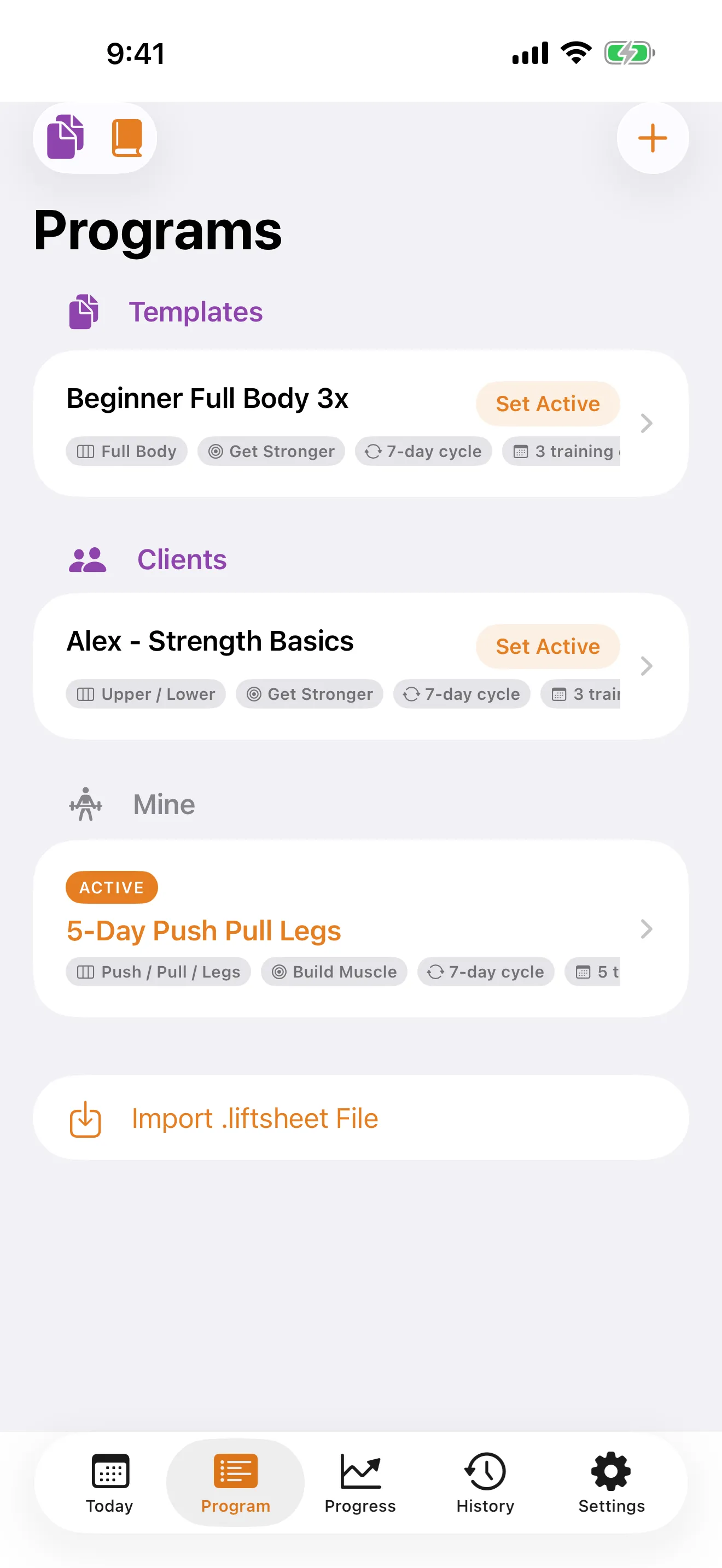
The Trainer Library has three tabs: Templates (your reusable blueprints), Clients (every client program, grouped by client name), and Mine (your own training). Each row supports swipe actions to quickly View, Edit, or Delete.
The support team is here to help you get the most out of LiftSheet.
[email protected]Last Updated: May 24, 2026
LiftSheet contains no advertising, no third-party analytics SDKs (no Google Analytics, no Facebook SDK), no ad networks, and no tracking pixels. The app works without requiring you to create an account.
Your workout logs, programs, exercise history, and personal records live on your iOS device by default. They are subject to iOS's built-in security and encryption protections, and to your device's iCloud backup if you have it enabled in iOS Settings.
Future versions of LiftSheet may add opt-in features (for example cross-device sync or sharing surfaces). Any such feature will be clearly labelled as opt-in, will be governed by an updated Privacy Policy, and will not change how existing on-device data is stored without your action.
LiftSheet uses Apple's In-App Purchase system for subscriptions and one-time purchases. Apple processes your payment; LiftSheet receives only a receipt token to verify entitlement. Your payment details are handled exclusively by Apple. See Apple's Privacy Policy for more.
You can export programs and workouts as .liftsheet files, PDFs, or CSV (Pro tier). Exports are generated on your device and only sent if you explicitly share them. LiftSheet does not monitor or retain copies of exported files.
LiftSheet is rated 4+ and is not directed at children under 13. If we become aware that a child under 13 has provided personal information, we will delete it.
We may update this notice from time to time. Updates will appear here with a new "Last Updated" date. The full legal Privacy Policy is also available at liftsheet.app/privacy.
Email: [email protected]